Featured image of post 音乐播放器

音乐播放器

字数: 2250

添加音乐播放器

方法一:网易云音乐

官网:https://github.com/metowolf/MetingJS

直接掉接口:

image-20250908130056052

 1
 2
 3
 4
 5
 6
 7
 8
 9
10
11
<!-- 【custom.html】 -->
<link rel="stylesheet" href="https://cdn.jsdelivr.net/npm/aplayer/dist/APlayer.min.css">
<script src="https://cdn.jsdelivr.net/npm/aplayer/dist/APlayer.min.js"></script>
<!-- require MetingJS -->
<script src="https://cdn.jsdelivr.net/npm/meting@2/dist/Meting.min.js"></script>

<meting-js
	server="netease"
	type="playlist"
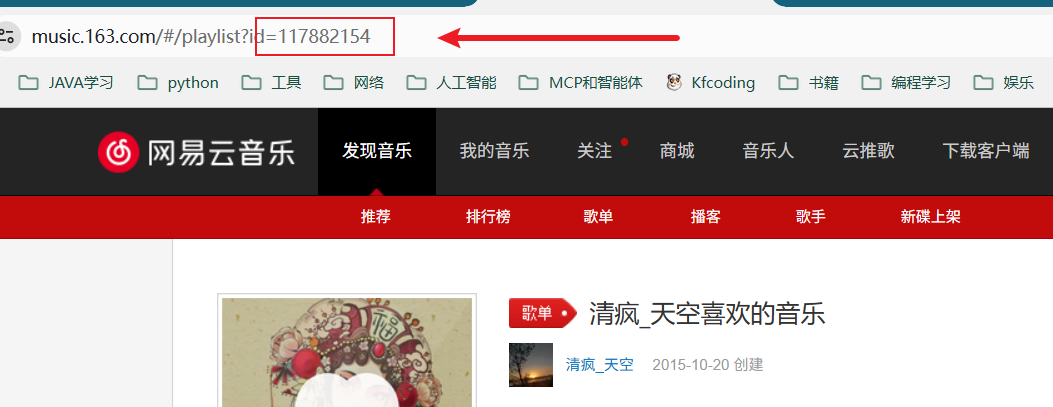
	id="117882154"> #网易云音乐id     
</meting-js>

添加在其他页面继续播放

 1
 2
 3
 4
 5
 6
 7
 8
 9
10
11
12
13
14
15
16
17
18
19
20
21
22
23
24
25
26
27
28
29
30
31
32
33
34
35
36
37
38
39
40
41
42
43
44
45
46
47
48
49
50
51
52
53
54
55
56
57
58
59
60
61
62
63
64
65
66
67
68
69
70
71
72
73
74
75
76
77
78
79
80
81
82
83
84
85
86
87
88
89
90
91
92
93
94
95
96
97
98
<!DOCTYPE html>
<html lang="zh-CN">
<head>
    <meta charset="UTF-8">
    <meta name="viewport" content="width=device-width, initial-scale=1.0">
    <title>音乐播放器</title>
    <link rel="stylesheet" href="https://cdn.jsdelivr.net/npm/aplayer/dist/APlayer.min.css">
</head>
<body>
    <!-- APlayer 容器 -->
    <div id="aplayer"></div>
    
    <!-- MetingJS 元素 -->
    <meting-js
        server="netease"
        type="playlist"
        id="117882154"
        fixed="true"
        autoplay="false">
    </meting-js>

    <!-- 引入 APlayer 和 MetingJS -->
    <script src="https://cdn.jsdelivr.net/npm/aplayer/dist/APlayer.min.js"></script>
    <script src="https://cdn.jsdelivr.net/npm/meting@2/dist/Meting.min.js"></script>

    <script>
        // 全局变量用于存储APlayer实例
        let ap = null;

        // 初始化播放器
        function initPlayer() {
            // 等待MetingJS加载完成
            const checkInterval = setInterval(() => {
                const playerElement = document.getElementById('aplayer');
                if (playerElement && playerElement.aplayer) {
                    clearInterval(checkInterval);
                    ap = playerElement.aplayer;
                    console.log('APlayer实例已获取', ap);
                    
                    // 恢复播放状态
                    restorePlaybackState();
                }
            }, 100);
        }

        // 恢复播放状态
        function restorePlaybackState() {
            const playInfo = JSON.parse(localStorage.getItem("playInfo"));
            if (!playInfo) {
                console.log('没有找到之前的播放记录');
                return;
            }

            // 等待APlayer完全加载
            setTimeout(() => {
                try {
                    // 切换歌曲
                    ap.list.switch(playInfo.index);
                    console.log(`正在恢复第${playInfo.index + 1}首歌曲...`);
                    
                    // 等待歌曲加载
                    setTimeout(() => {
                        // 调整播放进度
                        ap.seek(playInfo.currentTime);
                        
                        // 恢复播放/暂停状态
                        if (!playInfo.paused) {
                            ap.play();
                            console.log('已恢复播放');
                        } else {
                            console.log('已恢复播放进度(暂停状态)');
                        }
                    }, 800);
                } catch (error) {
                    console.error('恢复播放状态时出错:', error);
                }
            }, 500);
        }

        // 页面销毁前监听
        window.onbeforeunload = () => {
            if (ap) {
                // 将播放信息用对象封装,并存入到localStorage中
                const playInfo = {
                    index: ap.list.index,
                    currentTime: ap.audio.currentTime,
                    paused: ap.audio.paused
                };
                localStorage.setItem("playInfo", JSON.stringify(playInfo));
                console.log('播放状态已保存', playInfo);
            }
        };

        // 页面加载后初始化播放器
        window.addEventListener('load', initPlayer);
    </script>
</body>
</html>

方法2:原生 酷狗音乐

官网:https://github.com/DIYgod/APlayer

中文文档:https://aplayer.js.org/#/zh-Hans/

自定义音乐

 1
 2
 3
 4
 5
 6
 7
 8
 9
10
11
12
13
14
15
16
17
18
19
20
21
22
23
24
25
26
27
28
29
30
31
32
33
34
35
36
37
38
39
40
41
42
43
44
45
46
47
48
49
50
51
52
53
54
55
56
57
58
59
60
61
62
63
64
65
66
67
68
<!-- custom.html -->
<!--改为了本地引入 <link rel="stylesheet" href="https://cdn.jsdelivr.net/npm/aplayer/dist/APlayer.min.css"> -->
<script src="https://cdn.jsdelivr.net/npm/aplayer/dist/APlayer.min.js"></script>

<div id="aplayer"></div>

<script>
	// 音乐数据预处理
	const musicDir = '{{ .Site.Home.Permalink }}music/';
	const songs = [
		'任贤齐-伤心太平洋',
		'张韶涵-隐形的翅膀'
	];
	
	let audios = [];
	songs.forEach((item) => {
		const songInfo = item.split('-');
		audios.push({
			name: songInfo[1],
			artist: songInfo[0],
			url: musicDir + item + '/song.mp3', // 歌曲路径
			cover: musicDir + item + '/cover.jpg', // 封面路径
			lrc: musicDir + item + '/lyric.lrc', // 歌词路径
		});
	});
	
	const ap = new APlayer({
		container: document.getElementById('aplayer'),
		fixed: true,
		lrcType: 3,
		audio: audios
	});

	 /**
     * 页面销毁前监听
     */
    window.onbeforeunload = () => {
        // 将播放信息用对象封装,并存入到localStorage中
        const playInfo = {
            index: ap.list.index,
            currentTime: ap.audio.currentTime,
            paused: ap.paused
        };
        localStorage.setItem("playInfo", JSON.stringify(playInfo));
    };

    /**
     * 页面加载后监听
     */
    window.onload = () => {
        // 从localStorage取出播放信息
        const playInfo = JSON.parse(localStorage.getItem("playInfo"));
        if (!playInfo) {
            return;
        }
        // 切换歌曲
        ap.list.switch(playInfo.index);
        // 等待500ms再执行下一步(切换歌曲需要点时间,不能立马调歌曲进度条)
        setTimeout(() => {
            // 调整时长
            ap.seek(playInfo.currentTime);
            // 是否播放
            if (!playInfo.paused) {
                ap.play()
            }
        }, 500);
    };
</script>

网易云多ID(多音乐)

  1
  2
  3
  4
  5
  6
  7
  8
  9
 10
 11
 12
 13
 14
 15
 16
 17
 18
 19
 20
 21
 22
 23
 24
 25
 26
 27
 28
 29
 30
 31
 32
 33
 34
 35
 36
 37
 38
 39
 40
 41
 42
 43
 44
 45
 46
 47
 48
 49
 50
 51
 52
 53
 54
 55
 56
 57
 58
 59
 60
 61
 62
 63
 64
 65
 66
 67
 68
 69
 70
 71
 72
 73
 74
 75
 76
 77
 78
 79
 80
 81
 82
 83
 84
 85
 86
 87
 88
 89
 90
 91
 92
 93
 94
 95
 96
 97
 98
 99
100
101
102
103
104
105
106
107
108
109
110
111
112
113
114
115
116
117
118
119
120
121
122
123
124
125
126
127
128
129
130
131
132
133
134
135
136
137
138
<!DOCTYPE html>
<html lang="zh-CN">
<head>
    <meta charset="UTF-8">
    <meta name="viewport" content="width=device-width, initial-scale=1.0">
    <title>全局音乐播放器</title>
    <link rel="stylesheet" href="https://cdn.jsdelivr.net/npm/aplayer/dist/APlayer.min.css">
    <script src="https://cdn.jsdelivr.net/npm/aplayer/dist/APlayer.min.js"></script>
    <script src="https://cdn.jsdelivr.net/npm/meting@2/dist/Meting.min.js"></script>
</head>
<body>
    <div class="buttons">
        <button class="active" data-id="117882154">歌单1</button>
        <button data-id="2399935867">歌单2</button>
        <button data-id="2057627502">歌单3</button>
    </div>
    
    <div id="aplayer"></div>

    <script>
        // 全局变量用于存储APlayer实例
        let ap = null;
        let currentPlaylistId = '117882154';

        // 初始化播放器
        function initPlayer() {
            // 等待MetingJS加载完成
            const checkInterval = setInterval(() => {
                const playerElement = document.getElementById('aplayer');
                if (playerElement && playerElement.aplayer) {
                    clearInterval(checkInterval);
                    ap = playerElement.aplayer;
                    console.log('APlayer实例已获取', ap);
                    
                    // 恢复播放状态
                    restorePlaybackState();
                }
            }, 100);
        }

        // 恢复播放状态
        function restorePlaybackState() {
            const playInfo = JSON.parse(localStorage.getItem("playInfo"));
            if (!playInfo) {
                console.log('没有找到之前的播放记录');
                return;
            }

            // 等待APlayer完全加载
            setTimeout(() => {
                try {
                    // 切换歌曲
                    ap.list.switch(playInfo.index);
                    console.log(`正在恢复第${playInfo.index + 1}首歌曲...`);
                    
                    // 等待歌曲加载
                    setTimeout(() => {
                        // 调整播放进度
                        ap.seek(playInfo.currentTime);
                        
                        // 恢复播放/暂停状态
                        if (!playInfo.paused) {
                            ap.play();
                            console.log('已恢复播放');
                        } else {
                            console.log('已恢复播放进度(暂停状态)');
                        }
                    }, 800);
                } catch (error) {
                    console.error('恢复播放状态时出错:', error);
                }
            }, 500);
        }

        // 页面销毁前监听
        window.onbeforeunload = () => {
            if (ap) {
                // 将播放信息用对象封装,并存入到localStorage中
                const playInfo = {
                    index: ap.list.index,
                    currentTime: ap.audio.currentTime,
                    paused: ap.audio.paused
                };
                localStorage.setItem("playInfo", JSON.stringify(playInfo));
                console.log('播放状态已保存', playInfo);
            }
        };

        // 创建Meting元素
        function createMetingElement(playlistId) {
            const existingMeting = document.querySelector('meting-js');
            if (existingMeting) existingMeting.remove();
            
            const metingElement = document.createElement('meting-js');
            metingElement.setAttribute('server', 'netease');
            metingElement.setAttribute('type', 'playlist');
            metingElement.setAttribute('id', playlistId);
            metingElement.setAttribute('fixed', 'true');
            metingElement.setAttribute('autoplay', 'false');
            
            document.getElementById('aplayer').appendChild(metingElement);
            
            // 重新初始化播放器
            initPlayer();
        }

        // 按钮点击事件
        document.querySelectorAll('button').forEach(button => {
            button.addEventListener('click', function() {
                const playlistId = this.getAttribute('data-id');
                
                // 更新按钮状态
                document.querySelectorAll('button').forEach(btn => {
                    btn.classList.remove('active');
                });
                this.classList.add('active');
                
                // 保存当前播放状态
                if (ap) {
                    const playInfo = {
                        index: ap.list.index,
                        currentTime: ap.audio.currentTime,
                        paused: ap.audio.paused
                    };
                    localStorage.setItem("playInfo", JSON.stringify(playInfo));
                }
                
                // 创建新的Meting元素
                createMetingElement(playlistId);
                currentPlaylistId = playlistId;
            });
        });

        // 初始创建Meting元素
        createMetingElement(currentPlaylistId);
    </script>
</body>
</html>
最后更新于 2025年9月9日 10:00
发布了 5 篇文章 | 共 23.8K 字 | 总访客数: Loading | 总访问量: Loading
Hugo theme Stack designed by Jimmy | 黔ICP备2025049100号-1